Overview
Two Arc-connected Windows Server lab machines, agent validation, and one SQL Server Developer instance.
Classification: Validated lab work.
Operational scenario & objectives
Connect non-Azure lab servers to Azure Arc and verify the agent, service state, resource placement, and bounded SQL inventory.
Environment & technologies
HVHOST01 and VMM01 in a personal hybrid Windows lab; the published evidence also covers one SQL Server 2022 Developer instance.
Architecture
HVHOST01 and VMM01 in a personal hybrid Windows lab; the published evidence also covers one SQL Server 2022 Developer instance.
Explore infrastructure architecture →Implementation & administration
Hybrid management · Windows Server · SQL Server · Evidence-driven validation
On-premises Windows and SQL Server resources connected to Azure Arc.
Onboarded HVHOST01 and VMM01 from a personal Proxmox/QEMU lab into a bounded Azure resource group, validated the Connected Machine agent, completed SQL Server discovery on VMM01, and verified the SQL extension, licensing choice, telemetry state, and current limitations with fresh evidence.
Executive summary
The project extends an existing on-premises Windows management path into Azure without moving the workloads out of the lab. Proxmox remains the hypervisor, Windows Admin Center remains the local browser-based management point, and Azure Arc adds Azure resource representation, agent health, extension management, and SQL inventory for systems that continue to run on premises.
- Arc machines
- HVHOST01 and VMM01.
- SQL resource
- VMM01, SQL Server 2022 Developer, connected mode.
- Azure scope
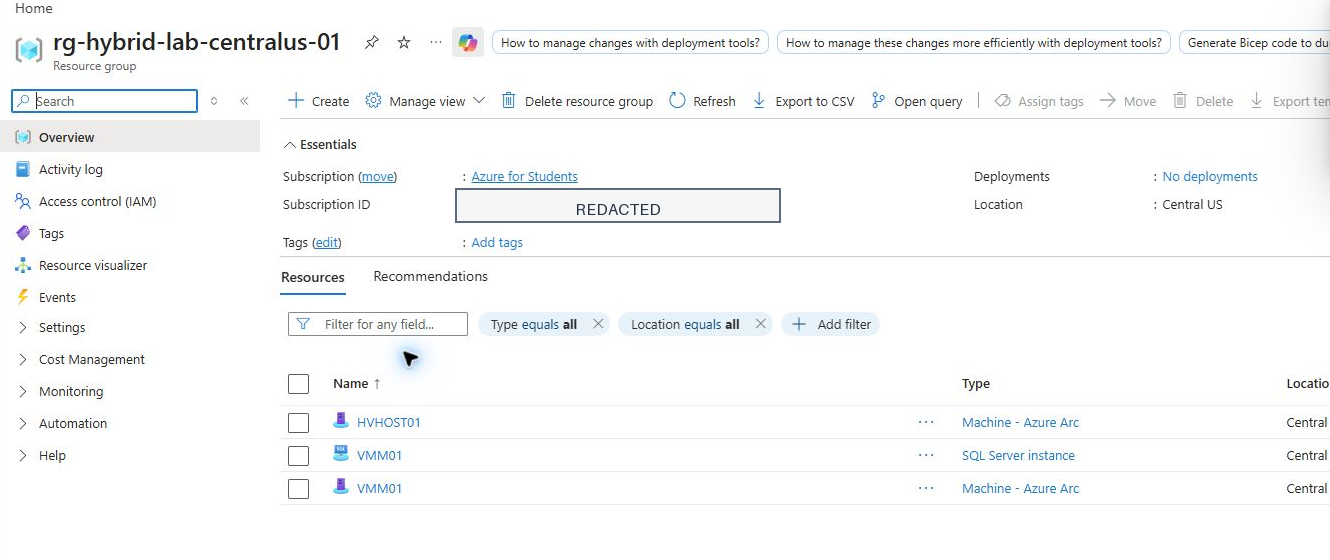
rg-hybrid-lab-centralus-01in Central US under the Azure for Students subscription.- Observed state
- Freshly collected on 2026-08-31; see the manifest for integrity records.
- Boundary
- Personal nonproduction lab; no production, enterprise-scale, availability, or business-impact claim.
Problem, objective, and architecture
Add cloud-based inventory and extension management while keeping the lab on premises.
The objective was to represent two Windows Server systems and the VMM01 SQL instance in Azure, preserve the existing local management design, and make every public claim traceable to current evidence.
Role of Proxmox
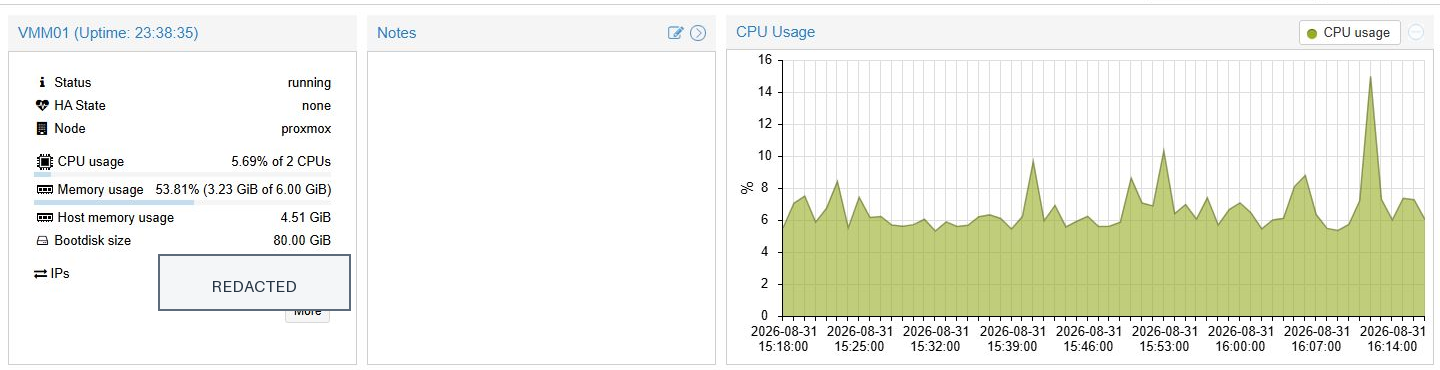
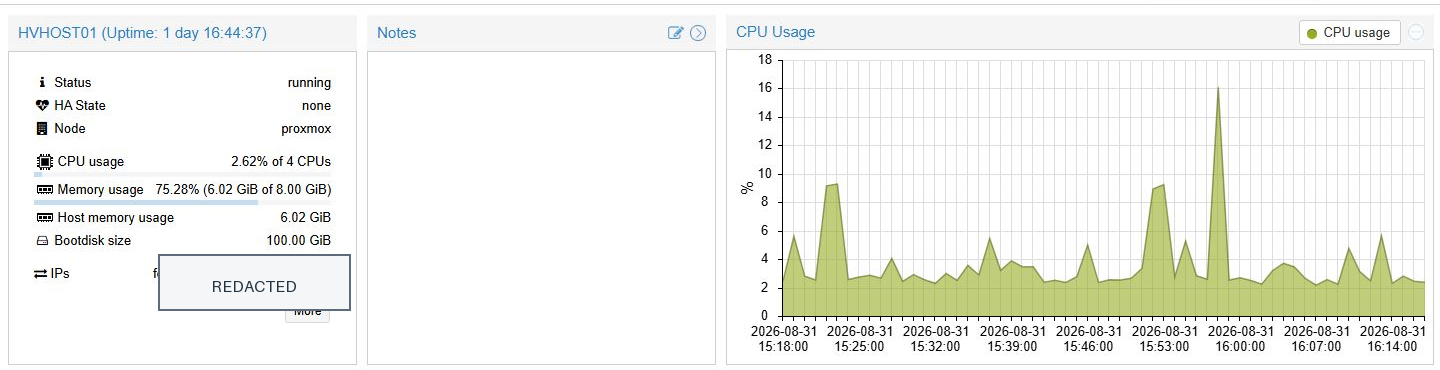
Proxmox supplies the QEMU virtualization layer. Both Arc-enabled Windows servers remain running as personal-lab virtual machines; Azure Arc does not replace or directly manage the hypervisor.
Role of Windows Admin Center
Windows Admin Center provides the local connection inventory and Azure integration surface. Its connection list shows both HVHOST01 and VMM01 with Azure Arc status Connected.
Identity separation
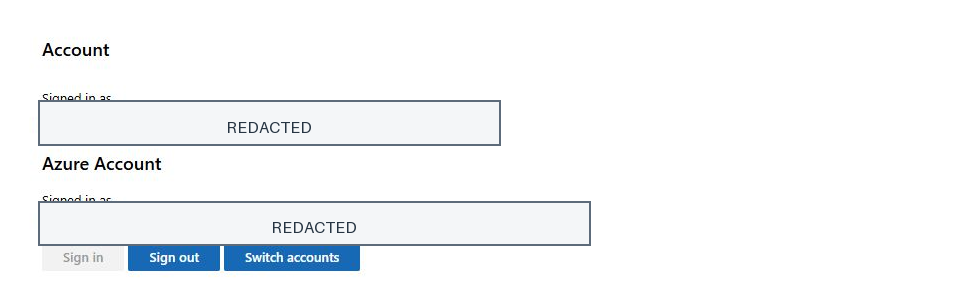
The Windows Admin Center gateway uses an on-premises Windows identity, while Azure integration uses a separate Azure identity. Public screenshots redact both account names and the email address while preserving the visible signed-in states.
Resource-group and RBAC boundary
The collected resources are grouped under rg-hybrid-lab-centralus-01. The current evidence does not enumerate role assignments, so it supports resource-group scope but makes no claim about a specific Owner, Contributor, or custom Azure RBAC role.
Onboarding and troubleshooting
Validate the missing agent, use the generated script, and verify the resulting Azure resource.
1. Connectivity before installation
The Windows Admin Center workflow initially appeared to stall while installing the Arc agent. Direct validation found that the Connected Machine agent executable was absent, while outbound TCP 443 connectivity to gbl.his.arc.azure.com succeeded.
2. Manual onboarding script
The Azure-generated onboarding script was transferred to VMM01 and executed through the authorized PowerShell remoting path. The agent installed, authenticated, created the Azure resource, and reported Connected.
3. Agent and service validation
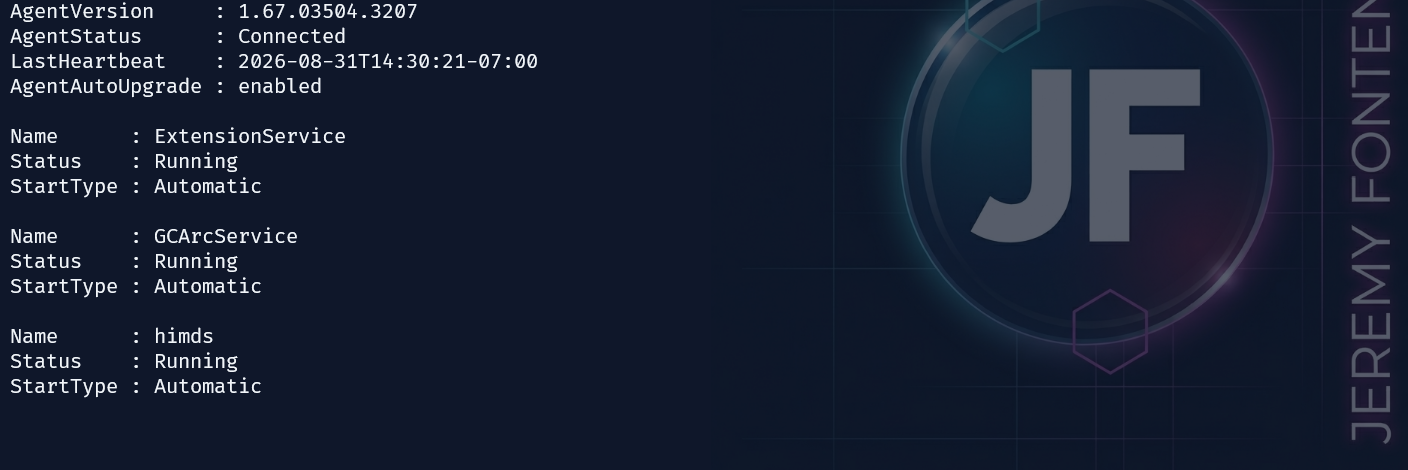
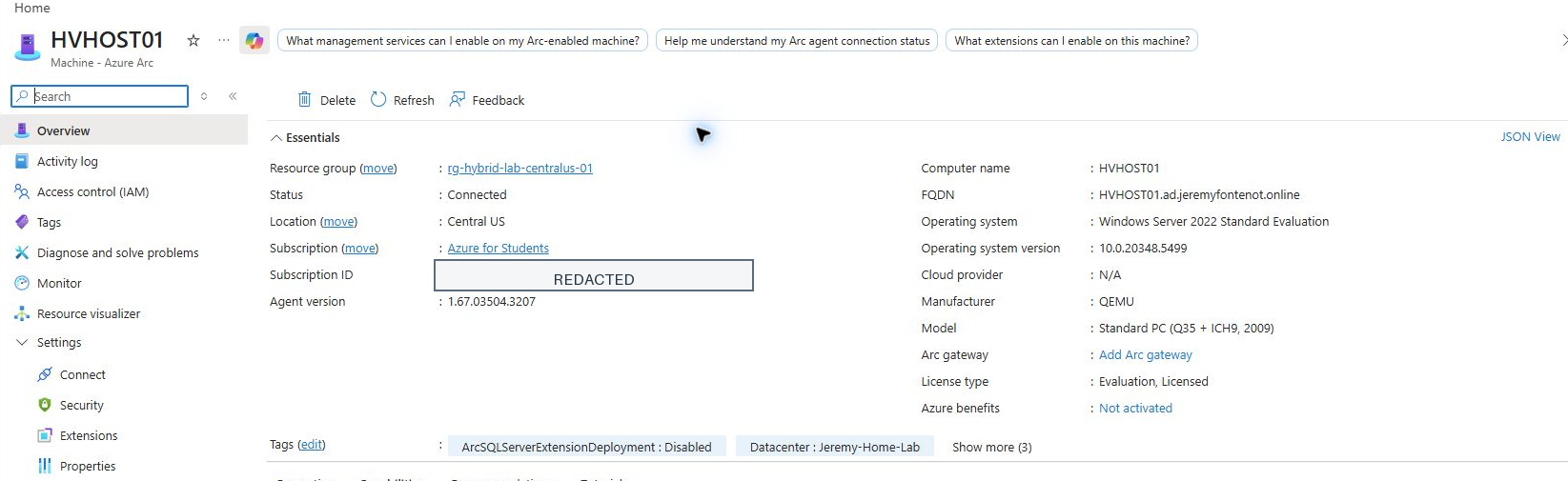
Fresh direct validation on HVHOST01 confirmed agent version 1.67.03504.3207, Connected status, enabled agent auto-upgrade, successful TCP 443 reachability, and the himds, ExtensionService, and GCArcService services running with Automatic startup.
4. Current access limitation
VMM01 answered WinRM but rejected the current Windows credential for a fresh remote session. Its local Arc and SQL services were not re-read directly during this collection; Azure portal and Windows Admin Center supplied the current connected, extension, SQL inventory, licensing, and telemetry evidence.
SQL Server discovery and extension
Move from a pending extension to a connected SQL inventory record.
Initial extension state
The SQL extension initially remained in Creating/ENABLING while the SqlServerExtension service was StartPending. Onboarding logs showed least-privilege configuration and local-group membership work still in progress.
Observed resolution
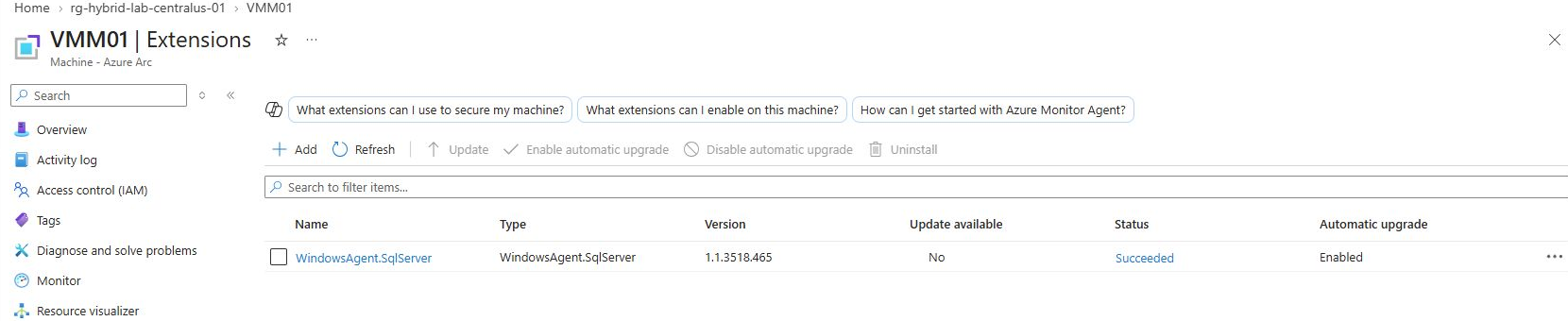
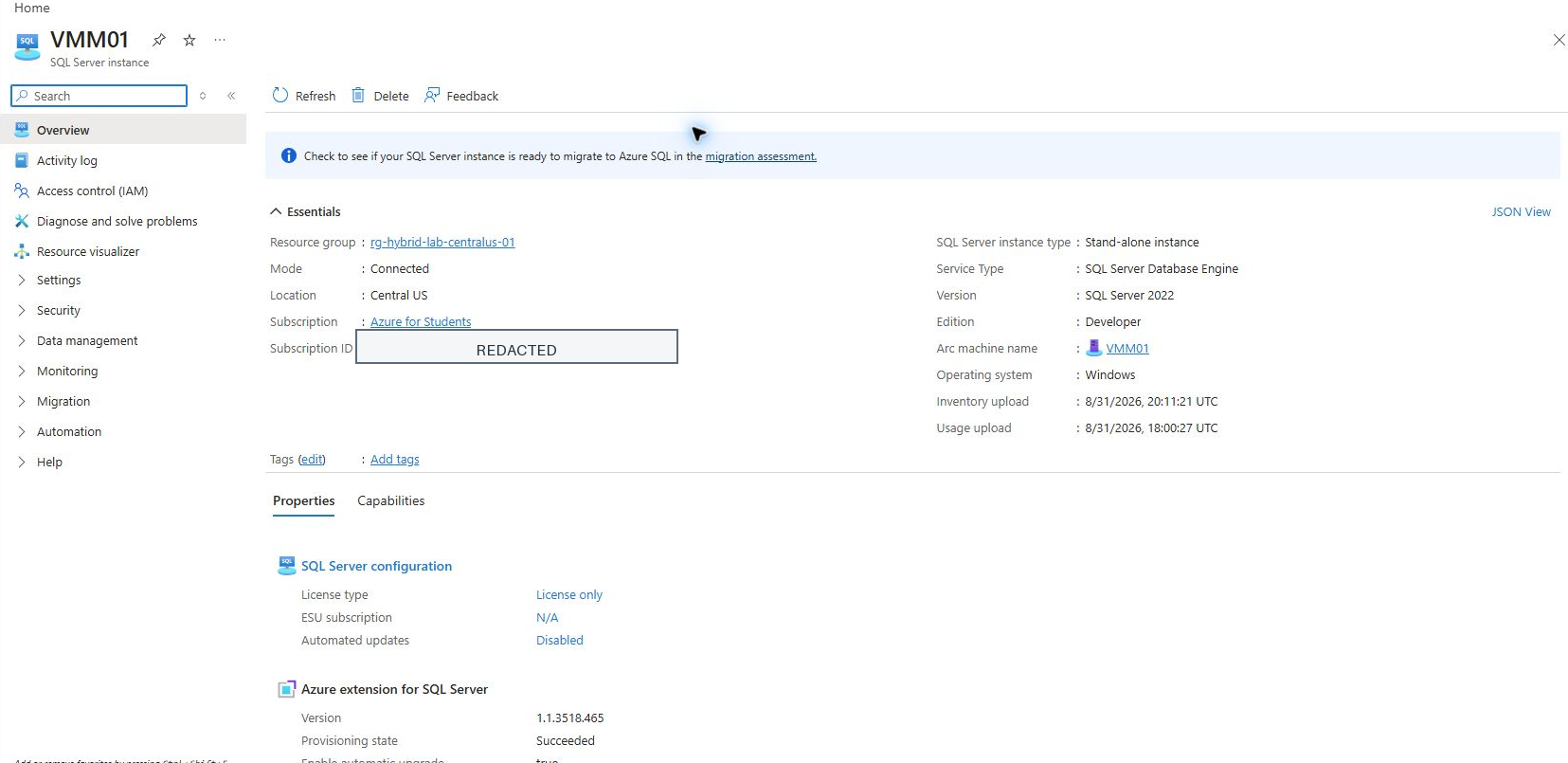
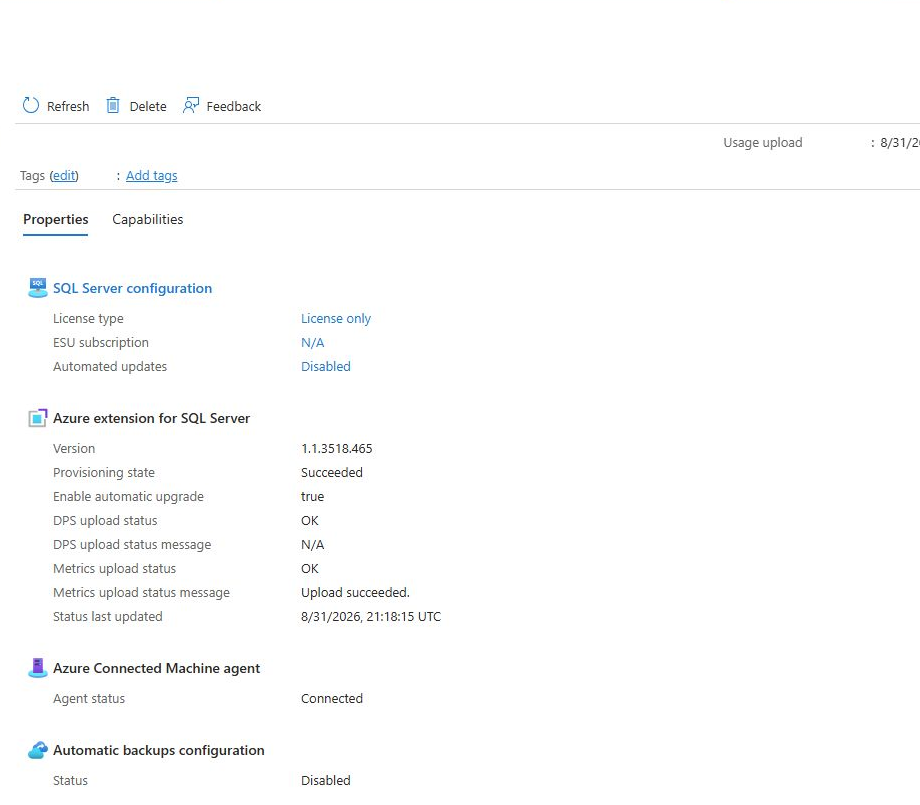
The service later reached Running, the WindowsAgent.SqlServer extension reached Succeeded, SQL inventory appeared, and DPS upload status reached OK. The current portal evidence shows extension version 1.1.3518.465 with automatic upgrade enabled.
Licensing decision
The Arc-enabled SQL resource reports SQL Server 2022 Developer edition. License only is selected instead of pay-as-you-go; Developer edition is not presented as production licensed.
Services not inferred
Azure Monitor, Azure Backup, Update Manager, Defender, Site Recovery, automated SQL updates, and automatic SQL backups are not described as enabled. The SQL overview explicitly showed automated updates and automatic backups Disabled.
Verified final state
Current results are separated from historical troubleshooting.
HVHOST01 Arc machine
Azure portal and direct agent output both report Connected in Central US; the three Arc services were running and TCP 443 validation succeeded.
VMM01 Arc machine
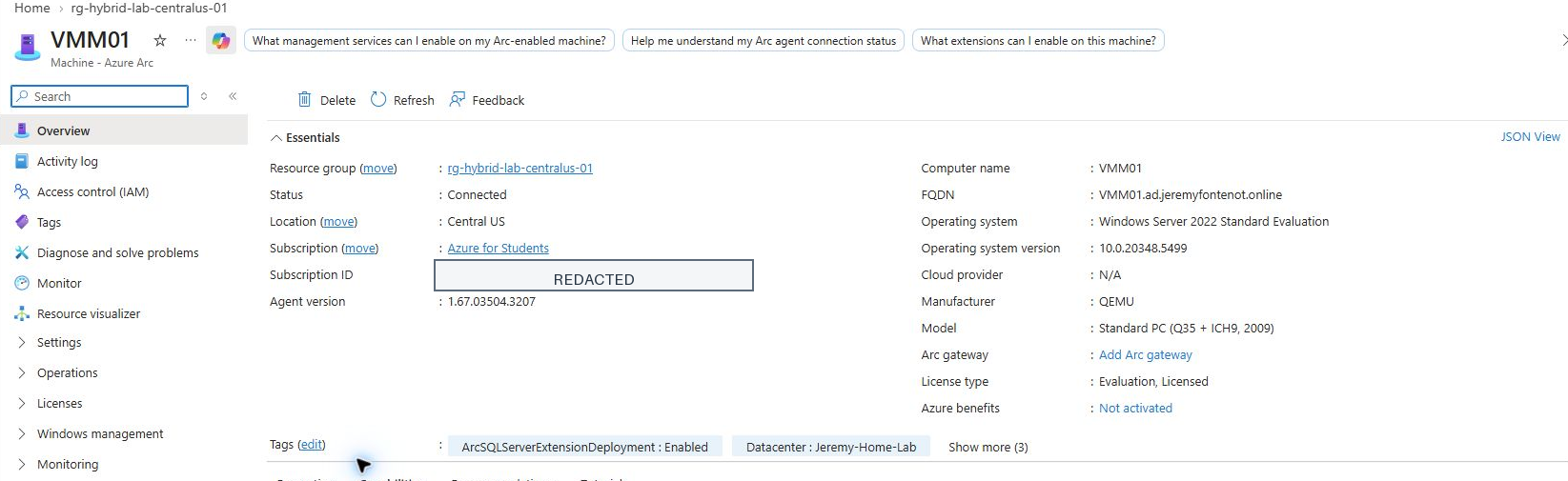
Azure portal and Windows Admin Center report Connected. The portal shows Windows Server 2022 Standard Evaluation and agent version 1.67.03504.3207.
WindowsAgent.SqlServer
Version 1.1.3518.465 reports Succeeded, no update available, and automatic upgrade Enabled.
VMM01 SQL Server instance
SQL Server 2022 Developer is inventoried in connected mode with License only, DPS OK, metrics OK, and Connected Machine agent status Connected.
Security and privacy controls
Publish the evidence, not the identities or control-plane identifiers.
Private originals
Fresh raw captures were retained outside the public repository. Published PNG files are cropped derivatives with tenant IDs, subscription IDs, account names, email addresses, private IP addresses, and unnecessary interface data removed or redacted.
No authentication material
No passwords, MFA codes, device-login codes, tokens, cookies, private keys, connection strings, or raw authentication logs are published.
Integrity records
The evidence manifest records SHA-256 hashes, byte sizes, dimensions, source context, transformation notes, and the specific claim supported by every public screenshot.
Least-claim posture
Connected and Succeeded states are reported only where current evidence shows them. Unavailable direct VMM01 service validation remains a named limitation.
Screenshot evidence
Fresh views from PowerShell, Proxmox, Windows Admin Center, and Azure.
Each image is a cropped and redacted derivative of a newly captured authenticated view. Captions state exactly what the visible fields support.

Skills demonstrated
Hybrid onboarding with operational boundaries and evidence integrity.
Limitations and next steps
A verified hybrid-management lab, not a production Azure operations claim.
The evidence supports two Arc-connected Windows Server lab machines, one Arc-enabled SQL Server 2022 Developer instance, current extension and telemetry states, and direct HVHOST01 agent/service validation. It does not prove production administration, enterprise scale, broad Azure RBAC ownership, high availability, disaster recovery, SLA performance, security assurance, or enabled Azure services beyond the fields shown. VMM01 local service state was not freshly read because the current Windows credential was rejected.
Practical next steps are to restore an approved VMM01 remoting path, repeat the local service and SQL checks, document the exact Azure RBAC assignment through a public-safe export, and evaluate optional Azure services separately before making any enablement claim.
The original case-study narrative and linked evidence provide the detailed record for this project.
Troubleshooting
The evidence preserves a direct-remoting limitation for VMM01. Portal and agent observations are reported within their actual scope; local service state is not inferred where it was not read.
Validation & results
Two connected Windows lab servers and one SQL Developer instance are supported by sanitized retained records, with remoting and administrative boundaries intact.
Evidence
VERY STRONG — portal state, Connected Machine agent validation, Windows services, SQL extension/inventory, sanitized screenshots, manifest/integrity records, and explicit limitations are documented.
Skills demonstrated
View the complete capability map →Limitations & claim boundaries
Next milestones
Restore an approved VMM01 remoting path and optionally re-read local Arc/SQL services and document exact Azure RBAC if those claims are later desired.