Overview
Real Microsoft-side configuration paired with explicitly simulated Apple enrollment and endpoint workflows.
Classification: Real configuration + simulation.
Operational scenario & objectives
Document a complete enterprise management runbook while clearly separating configured controls, available capabilities, and simulated endpoint procedures.
Environment & technologies
Real Intune tenant and APNs relationship; macOS policy configuration. No managed Mac or legitimate ABM/ADE deployment is claimed.
Architecture
Real Intune tenant and APNs relationship; macOS policy configuration. No managed Mac or legitimate ABM/ADE deployment is claimed.
Implementation & administration
M365 Lab Project 05 · COMPLETE
macOS management, designed like an enterprise control plane.
Real Microsoft Intune configuration for APNs, macOS compliance, and FileVault—paired with a rigorously bounded Apple Business Manager, ADE, Platform SSO, certificate, and lifecycle runbook.
Architecture
One chain of trust. Three explicit evidence states.
Every major component is labeled as real configuration, validated capability, or simulated/documented procedure. No endpoint result is claimed without an enrolled Mac.
Implemented in the real tenant
Microsoft-side controls that actually exist.
- Apple MDM Push certificate created and accepted by Intune.
- APNs expiration documented for 2027-09-26.
- Project 5 - macOS Enterprise Compliance created.
- System Integrity Protection, password, encryption, firewall, Stealth Mode, and Gatekeeper requirements configured.
- Project 5 - macOS FileVault Baseline created in Settings Catalog.
- FileVault enabled, anti-disable control configured, and recovery-key escrow location guidance defined.
Intentionally not overstated
Apple-side and endpoint-only work stays documented.
- No Apple Business Manager organization was fabricated.
- No Enrollment Program Token or ADE device sync is claimed.
- No Platform SSO registration is claimed on a managed Mac.
- No EAP-TLS authentication or certificate issuance is claimed.
- No FileVault recovery key is published or represented as escrowed.
- No retire, wipe, or reassignment action is claimed as executed.
Validated capability surface
What the real tenant exposes for macOS administration.
Platform SSO
Platform SSO settings were located in the real macOS Settings Catalog. Endpoint registration remains unvalidated without a managed Mac.
Enterprise Wi-Fi
Intune exposes WPA-Enterprise, WPA2-Enterprise, EAP-FAST, EAP-SIM, EAP-TLS, EAP-TTLS, LEAP, and PEAP. The documented design uses WPA2-Enterprise + EAP-TLS.
SCEP / PKCS
macOS SCEP, PKCS, imported PKCS, and trusted-certificate workflows are available. No live enterprise PKI issuance is claimed.
DMG, PKG, M365, Edge
macOS app deployment types include DMG, PKG, line-of-business apps, Microsoft 365 Apps, Microsoft Edge, Defender, web clips, and links.
0 enrolled Macs
The real inventory view was validated and currently contains zero managed macOS devices—a deliberate boundary, not a hidden gap.
Retire, wipe, delete, restart, rename, sync
The real bulk-action surface exposes the expected lifecycle controls. None was executed without a managed test Mac.
Evidence-backed documentation
Every claim has a narrow proof target.
The project documentation records implementation state, validation boundaries, operational renewal work, lifecycle administration, and troubleshooting without publishing secrets.
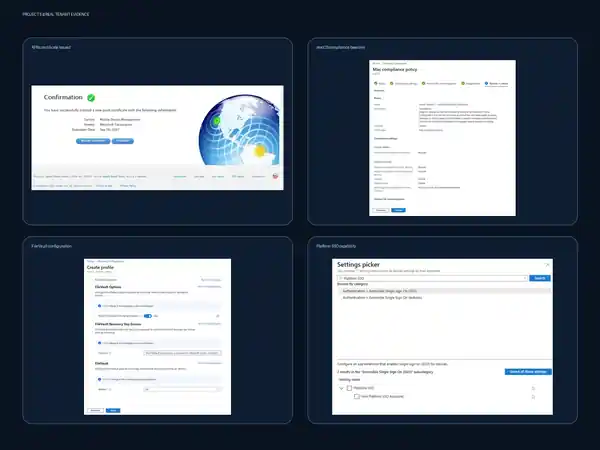
The screenshot says exactly what the caption says.
This published derivative intentionally excludes Apple account identifiers and certificate details. It proves Microsoft-side configuration and capability only; ABM, ADE, endpoint enforcement, recovery-key escrow, and destructive lifecycle actions remain documented rather than fabricated.
Real configuration record
APNs, compliance, FileVault, enrollment restrictions, Platform SSO capability, Wi-Fi, SCEP, apps, inventory, and lifecycle inspection.
Real vs. simulated matrix
A complete matrix distinguishes configured objects, validated capabilities, endpoint-dependent checks, and simulation-only procedures.
Renewal calendar
APNs renewal, ABM token renewal, certificate trust, application review, compliance review, and FileVault recovery validation are treated as recurring operational responsibilities.
Retire, wipe, reassignment, lost/stolen
The runbook separates record deletion from destructive wipe and documents ownership checks, authorization, asset state, identity revocation, and reassignment.
Project 5 — Simulated macOS ABM to Intune Runbook / README.md
Project 5 — Simulated macOS ABM to Intune Runbook
Status: COMPLETE
Project type: FREE WITH SIMULATION
Microsoft-side implementation: REAL CONFIGURATION where validated
Apple Business Manager / ADE: SIMULATED / DOCUMENTED
Objective
Demonstrate an enterprise macOS management design spanning Apple Business Manager (ABM), Microsoft Intune, Automated Device Enrollment (ADE), Microsoft Entra authentication, Platform SSO, enterprise Wi-Fi, certificates, FileVault, compliance, application deployment, inventory, and lifecycle administration.
The project deliberately separates what was actually configured in the Microsoft Intune tenant from Apple- and endpoint-dependent workflows that could not be executed legitimately in the lab.
What was actually configured
The following work was performed in the real Microsoft Intune tenant:
- Apple MDM Push (APNs) certificate created through Apple's Push Certificates Portal and uploaded to Intune.
- APNs certificate validated as active in Intune; renewal due 2027-09-26.
- macOS compliance policy created:
- System Integrity Protection required.
- Password required to unlock.
- Storage encryption required.
- Firewall enabled.
- Stealth Mode enabled.
- Gatekeeper limited to the Mac App Store and identified developers.
- Noncompliance marked immediately.
- macOS FileVault Settings Catalog profile created:
- FileVault enabled.
- Users prevented from disabling FileVault.
- Recovery-key escrow location guidance configured.
- Intune macOS enrollment restrictions reviewed and validated.
- Platform SSO configuration capability reviewed in the Settings Catalog.
- Enterprise Wi-Fi capability reviewed, including WPA/WPA2-Enterprise and EAP methods.
- SCEP certificate profile capability reviewed.
- macOS app deployment types reviewed.
- macOS inventory and bulk lifecycle actions reviewed.
What remains simulated/documented
The following workflows are documented but were not represented as implemented:
- Apple Business Manager organization enrollment and verification.
- Reseller/device assignment into ABM.
- Intune Enrollment Program Token exchange with ABM.
- Automated Device Enrollment synchronization.
- ADE enrollment profile deployment.
- macOS Setup Assistant ADE experience.
- Platform SSO registration on a managed Mac.
- Certificate issuance through a live enterprise PKI/SCEP path.
- Enterprise RADIUS authentication.
- FileVault recovery-key escrow from an enrolled Mac.
- Compliance evaluation on an enrolled Mac.
- App installation on a managed Mac.
- Device reassignment, retire, wipe, and lost/stolen execution against a real Mac.
Architecture
Apple procurement / reseller
        ↓
Apple Business Manager
        ↓
Intune Enrollment Program Token
        ↓
Automated Device Enrollment profile
        ↓
macOS Setup Assistant
        ↓
Microsoft Entra authentication
        ↓
Microsoft Intune enrollment
        ↓
Configuration + applications + compliance
        ↓
FileVault + recovery-key escrow
        ↓
Inventory + lifecycle administration
See architecture.md for the full real-versus-simulated boundary.
Evidence
The evidence gallery is available at:
Screenshots are direct captures from the real Intune tenant or Apple Push Certificates Portal. No simulated screenshot is presented as real administration.
Documentation
- Architecture
- Implementation
- Validation
- Troubleshooting
- Lessons learned
- Renewal calendar
- Device lifecycle
- Simulated deployment scenario
- Portfolio summary
Security and evidence handling
The repository does not publish Apple credentials, private keys, enrollment tokens, bearer tokens, FileVault recovery keys, passwords, MFA secrets, or session cookies. Screenshots selected for publication avoid personal Apple-account identifiers and sensitive certificate material.
Technologies demonstrated
Apple Business Manager architecture, Apple Push Notification service, Microsoft Intune, Microsoft Entra ID, Automated Device Enrollment concepts, Platform SSO, Settings Catalog, FileVault, macOS compliance, enterprise Wi-Fi, EAP-TLS, SCEP/PKCS concepts, macOS application deployment, inventory, device lifecycle, renewal operations, and evidence-based administration.
Architecture — macOS ABM to Intune / architecture.md
Architecture — macOS ABM to Intune
Status boundary
This project uses three explicit implementation states:
- REAL CONFIGURATION — actually configured or directly validated in the real Microsoft Intune tenant.
- SIMULATED / DOCUMENTED — accurately designed and documented, but not executed because the required Apple infrastructure or managed macOS endpoint is unavailable.
- NOT VALIDATED — a Microsoft-side policy may exist, but endpoint behavior was not tested on an enrolled Mac.
Intended enterprise flow
Authorized reseller / Apple procurement
        │
        ▼
Apple Business Manager
        │
        │ device assignment to MDM server
        ▼
Microsoft Intune MDM server
        │
        │ Enrollment Program Token
        ▼
Automated Device Enrollment
        │
        ▼
macOS Setup Assistant
        │
        ▼
Microsoft Entra authentication
        │
        ▼
Microsoft Intune enrollment
        │
        ├───────────────┬────────────────┬────────────────┐
        ▼               ▼                ▼                ▼
Configuration       Applications      Compliance       Security
profiles                                                controls
        │               │                │                │
        ├─ Platform SSO │                │                ├─ FileVault
        ├─ Wi-Fi / PKI  │                │                └─ Firewall
        └─ restrictions │                │
        └───────────────┴────────────────┴────────────────┘
                                │
                                ▼
                    Inventory + lifecycle
                                │
                  ┌─────────────┼─────────────┐
                  ▼             ▼             ▼
                Retire         Wipe       Reassignment
Apple service boundary
Apple Push Notification service — REAL CONFIGURATION
A real Apple MDM Push certificate was created in Apple's Push Certificates Portal using the Intune-generated CSR and uploaded back to the Intune tenant.
Validated state:
- Vendor: Microsoft Corporation.
- APNs certificate created successfully.
- Intune upload completed successfully.
- Certificate expiration: 2027-09-26.
The Apple account used to own the certificate is intentionally excluded from public evidence.
Apple Business Manager — SIMULATED / DOCUMENTED
No Apple Business Manager organization is available in the lab. Therefore, the following are not represented as implemented:
- organization verification;
- reseller/device assignment;
- MDM server creation in ABM;
- ABM server token issuance;
- Enrollment Program Token import;
- ADE device sync;
- ADE profile assignment;
- Setup Assistant ADE behavior.
Microsoft service boundary
Microsoft Intune — REAL CONFIGURATION
The real tenant was used to create or inspect:
- Apple enrollment administration;
- macOS compliance policy;
- macOS FileVault Settings Catalog profile;
- macOS enrollment restrictions;
- Platform SSO settings;
- enterprise Wi-Fi settings;
- SCEP certificate settings;
- macOS application types;
- macOS inventory;
- macOS bulk device lifecycle actions.
Microsoft Entra ID
Microsoft Entra is the intended identity provider for Company Portal enrollment and Platform SSO. Endpoint Platform SSO registration is NOT VALIDATED because there is no enrolled macOS endpoint.
Real vs. simulated matrix
| Component | Classification | Evidence / boundary |
|---|---|---|
| Intune tenant access | REAL CONFIGURATION | Real portal configuration captured |
| APNs certificate | REAL CONFIGURATION — COMPLETE | Created in Apple portal; uploaded to Intune |
| ABM organization | SIMULATED / DOCUMENTED | No ABM organization available |
| Enrollment Program Token | SIMULATED / DOCUMENTED | Intune creation workflow inspected only |
| ADE | SIMULATED / DOCUMENTED | Requires ABM + eligible device |
| macOS compliance policy | REAL CONFIGURATION — COMPLETE | Policy created in Intune |
| Compliance enforcement | NOT VALIDATED | No enrolled macOS endpoint |
| FileVault policy | REAL CONFIGURATION — COMPLETE | Settings Catalog profile created |
| FileVault encryption on endpoint | NOT VALIDATED | No enrolled macOS endpoint |
| Recovery-key escrow | NOT VALIDATED | No enrolled macOS endpoint |
| Platform SSO capability | REAL CONFIGURATION — VALIDATED | Settings exposed in Intune |
| Platform SSO endpoint registration | SIMULATED / DOCUMENTED | No managed Mac |
| Enterprise Wi-Fi capability | REAL CONFIGURATION — VALIDATED | Enterprise profile surface inspected |
| WPA2-Enterprise + EAP-TLS | SIMULATED / DOCUMENTED DESIGN | No RADIUS/PKI deployment |
| SCEP certificate capability | REAL CONFIGURATION — VALIDATED | SCEP profile surface inspected |
| Certificate issuance | SIMULATED / DOCUMENTED | No live enterprise PKI/SCEP service |
| macOS application deployment capability | REAL CONFIGURATION — VALIDATED | Supported app types inspected |
| Application installation | NOT VALIDATED | No managed Mac |
| macOS inventory | REAL CONFIGURATION — VALIDATED | Inventory page available; 0 Macs enrolled |
| Retire / Wipe / Delete / Restart / Rename / Sync | REAL CONFIGURATION — VALIDATED CAPABILITY | Actions exposed; none executed |
| Device reassignment | SIMULATED / DOCUMENTED | No enrolled Mac |
| Lost/stolen workflow | SIMULATED / DOCUMENTED | Operational procedure only |
Enterprise Wi-Fi design
The intended secure WLAN model is:
macOS device
   │
   ├─ trusted root certificate
   ├─ SCEP/PKCS device certificate
   │
   ▼
WPA2-Enterprise / EAP-TLS
   │
   ▼
RADIUS / network policy service
   │
   ▼
Enterprise wireless network
The Intune tenant exposed WPA-Enterprise, WPA2-Enterprise, EAP-FAST, EAP-SIM, EAP-TLS, EAP-TTLS, LEAP, and PEAP. EAP-TLS is the documented design because it supports certificate-based device authentication without depending on user passwords for Wi-Fi access.
Security design principles
- Require FileVault encryption.
- Prevent users from disabling FileVault after policy enforcement.
- Escrow the personal recovery key to the management service when a managed Mac exists.
- Require System Integrity Protection.
- Require password-protected unlock.
- Enable firewall and Stealth Mode.
- Preserve Gatekeeper restrictions.
- Prefer certificate-based enterprise Wi-Fi.
- Keep APNs renewal ownership documented.
- Separate destructive lifecycle operations from routine sync/restart actions.
- Never publish recovery keys, token contents, credentials, or certificate private material.
macOS Device Lifecycle Runbook / device-lifecycle.md
macOS Device Lifecycle Runbook
1. Procurement and assignment
SIMULATED / DOCUMENTED
Preferred enterprise path:
- Purchase through Apple or an authorized reseller linked to the ABM organization.
- Verify the device appears in Apple Business Manager.
- Assign the device to the Microsoft Intune MDM server.
- Synchronize the Enrollment Program Token in Intune.
- Assign the correct ADE profile.
2. Enrollment
SIMULATED / DOCUMENTED
- User powers on or resets the Mac.
- Apple activation identifies the device as organization-owned.
- ADE directs the device to Intune.
- Setup Assistant applies the configured enrollment experience.
- User authenticates where required.
- Intune enrollment completes.
- Company Portal / Platform SSO registration follows the organization design.
3. Configuration and security
Microsoft-side configuration demonstrated in the real tenant includes:
- compliance baseline;
- FileVault baseline;
- Platform SSO capability;
- enterprise Wi-Fi capability;
- certificate profile capability;
- app deployment capability.
Endpoint enforcement remains unvalidated without an enrolled Mac.
4. Inventory and ownership
The Intune macOS inventory surface exposes:
- device name;
- management authority;
- ownership;
- compliance;
- OS and version;
- primary user;
- last check-in.
Current lab inventory: 0 macOS devices.
5. Routine operations
Available real Intune actions include:
- Sync — request management check-in.
- Restart — restart the managed device.
- Rename — change device display/name where supported.
6. Retirement
SIMULATED / DOCUMENTED
Use when management should be removed without treating the device as stolen or requiring a factory reset. Confirm ownership and data-handling requirements before choosing Retire.
7. Wipe
SIMULATED / DOCUMENTED
Use only after validating:
- device identity;
- ownership;
- authorization;
- data-retention requirements;
- reassignment or disposal plan.
A wipe is destructive and should be treated as a controlled administrative action.
8. Delete
Deleting the Intune object is not equivalent to securely wiping the device. Confirm the device has already been retired/wiped or otherwise handled appropriately before deleting the management record.
9. Reassignment
SIMULATED / DOCUMENTED
For corporate devices:
- Capture required asset state.
- Retire/wipe according to policy.
- Reassign in ABM if the MDM destination changes.
- Ensure the correct ADE profile is assigned.
- Reset the Mac.
- Enroll the next user through Setup Assistant.
- Validate inventory, compliance, FileVault, apps, and authentication.
10. Lost or stolen device
SIMULATED / DOCUMENTED
- Verify the asset and user.
- Escalate to security/management.
- Revoke or block identity sessions as policy requires.
- Evaluate remote wipe.
- Revoke device certificates where appropriate.
- Preserve incident records.
- Update asset ownership/status.
- Do not expose recovery keys or credentials during evidence capture.
Project 5 Evidence Index / README.md
Project 5 Evidence Index
The public evidence in this folder is deliberately sanitized and narrowly captioned. It proves Microsoft-side configuration and capability without implying that Apple Business Manager, Automated Device Enrollment, or a managed macOS endpoint exists in this lab.
Published screenshot evidence
Security and management proof board
Open the screenshot proof board
The board is a derived composite built from four screenshots captured during this Project 5 session:
- Apple Push Certificates Portal confirmation — proves Apple issued a new Mobile Device Management push certificate for Microsoft Corporation with expiration September 26, 2027.
- macOS compliance policy review — proves the real Intune policy was configured with System Integrity Protection, password, storage encryption, firewall, Stealth Mode, and Gatekeeper requirements before creation.
- macOS FileVault Settings Catalog configuration — proves FileVault was set to On, users were prevented from disabling it, and recovery-key escrow location guidance was configured.
- Platform SSO settings discovery — proves the real Intune Settings Catalog exposes the Platform SSO configuration surface.
The board proves only the states described above. It does not prove macOS endpoint enforcement, recovery-key escrow, Platform SSO registration, or ADE enrollment.
Additional validated observations
The following real Intune capability observations are documented in the project runbook and were captured during the same session:
- macOS app deployment types included Microsoft Edge, Microsoft 365 Apps, Microsoft Defender for Endpoint, web clips, web links, line-of-business apps, DMG, and PKG.
- macOS inventory was available and showed 0 devices.
- macOS bulk device actions exposed Delete, Retire, Wipe, Restart, Rename, and Sync.
- Enterprise Wi-Fi exposed WPA-Enterprise and WPA2-Enterprise.
- EAP methods included EAP-FAST, EAP-SIM, EAP-TLS, EAP-TTLS, LEAP, and PEAP.
- macOS SCEP configuration exposed certificate type, subject/SAN, validity, key usage, key size, root certificate, and EKU controls.
These observations are classified as REAL CAPABILITY VALIDATION, not endpoint implementation.
Why only a sanitized derivative is published
Source screenshots from the working session are retained in the conversation/evidence workflow, but only the sanitized composite is published here. This prevents unnecessary exposure of Apple account identifiers, certificate identifiers, or other tenant-specific details while preserving direct visual proof of the configuration work.
Evidence handling rules
- No Apple account identifier is intentionally published.
- No APNs PEM file, certificate private key, recovery key, enrollment token, ABM token, password, bearer token, session cookie, or MFA secret is stored here.
- No simulated ABM/ADE screenshot is used.
- Documentation, not fabricated portal evidence, is used for simulated Apple Business Manager and Automated Device Enrollment workflows.
Implementation / implementation.md
Implementation
1. Apple MDM Push certificate — REAL CONFIGURATION
The Intune Apple enrollment page initially showed the Apple MDM Push Certificate as Not set up.
Implementation sequence:
- Accepted Microsoft's Apple data-sharing permission prompt in Intune.
- Downloaded the Intune certificate signing request (CSR).
- Opened Apple's Push Certificates Portal.
- Accepted Apple's MDM certificate terms.
- Uploaded the Intune-generated CSR.
- Apple issued a new Mobile Device Management push certificate for Microsoft Corporation.
- Downloaded the resulting PEM certificate.
- Returned to Intune.
- Entered the Apple account used to create the certificate.
- Uploaded the PEM certificate.
- Intune reported successful MDM push certificate creation.
- Final Intune state showed the certificate as active.
Validated expiration: 2027-09-26.
No Apple credentials, PEM file, private key material, certificate serial number, or Apple account identifier are published.
2. Enrollment Program Token / ADE — SIMULATED / DOCUMENTED
The real Intune tenant was used to inspect the Enrollment Program Token workflow.
Intune exposes the expected sequence:
- Grant Microsoft permission to exchange device/user information with Apple.
- Download the Intune public-key certificate.
- Open Apple Business Manager.
- Create the ABM MDM server relationship.
- Upload the Intune public key in ABM.
- Download the ABM server token.
- Enter the Apple ID used for token ownership.
- Upload the token to Intune.
- Sync assigned devices.
- Create and assign ADE profiles.
The lab has no Apple Business Manager organization, so no token was created and no device was synchronized.
3. macOS compliance baseline — REAL CONFIGURATION
Policy:
Project 5 - macOS Enterprise Compliance
Configured settings:
- Require System Integrity Protection.
- Require a password to unlock devices.
- Require encryption of data storage.
- Enable Firewall.
- Enable Stealth Mode.
- Gatekeeper: allow apps from the Mac App Store and identified developers.
- Mark device noncompliant immediately.
Assignment:
- intentionally unassigned because there is no managed macOS test endpoint.
Result:
- policy object created successfully in the real Intune tenant;
- monitoring showed 0 devices, which matches the known lab inventory.
4. FileVault baseline — REAL CONFIGURATION
Policy:
Project 5 - macOS FileVault Baseline
Profile type:
- macOS Settings Catalog.
Configured controls:
FileVault > Enable = OnFileVault Options > Prevent FileVault From Being Disabled = True- recovery-key escrow
Locationguidance configured.
The profile was intentionally left unassigned because there is no managed macOS endpoint.
What is proven:
- the policy exists;
- the configured settings are visible in the real Intune tenant.
What is not proven:
- FileVault was enabled on a Mac;
- a recovery key was successfully escrowed;
- the recovery key was rotated or recovered.
5. Platform SSO — REAL CAPABILITY, DOCUMENTED DEPLOYMENT
A macOS Settings Catalog review confirmed:
Authentication > Extensible Single Sign On (SSO) > Platform SSO
The review profile was canceled after capability inspection to avoid leaving a nonfunctional placeholder policy.
A production deployment would also require a managed macOS endpoint, Company Portal / Microsoft Enterprise SSO plug-in prerequisites, supported macOS version, and actual registration validation.
6. Enterprise Wi-Fi — REAL CAPABILITY, DOCUMENTED DEPLOYMENT
The macOS Wi-Fi template exposes:
- Device Channel deployment;
- Basic and Enterprise profile types;
- WPA-Enterprise;
- WPA2-Enterprise;
- EAP-FAST;
- EAP-SIM;
- EAP-TLS;
- EAP-TTLS;
- LEAP;
- PEAP;
- proxy options;
- MAC address randomization controls.
The portfolio design uses WPA2-Enterprise + EAP-TLS with trusted-root and client-certificate deployment.
No fake SSID, RADIUS server, or certificate authority was created.
7. Certificate deployment — REAL CAPABILITY, DOCUMENTED ISSUANCE
The macOS SCEP certificate template exposes:
- deployment channel;
- certificate type;
- subject name format;
- subject alternative names;
- validity period;
- key usage;
- key size;
- trusted root certificate;
- extended key usage.
No certificate was issued because the lab does not have a configured enterprise SCEP/PKI path for macOS.
8. Application deployment — REAL CAPABILITY
The real Intune macOS app surface exposes:
- Microsoft Edge for macOS;
- Microsoft 365 Apps for macOS;
- Microsoft Defender for Endpoint (macOS);
- macOS web clip;
- web link;
- line-of-business app;
- macOS app (DMG);
- macOS app (PKG).
No placeholder application was created because there is no managed Mac on which to validate installation.
9. Enrollment restrictions — REAL VALIDATION
Default macOS enrollment restrictions were reviewed.
Observed state:
- macOS enrollment: Allow.
- personally owned macOS devices: Allow.
- minimum OS: not configured.
- maximum OS: not configured.
The default tenant-wide restriction was not modified merely for portfolio appearance.
10. Inventory and lifecycle — REAL CAPABILITY
The macOS inventory page showed 0 devices.
The bulk action workflow exposed these macOS actions:
- Delete
- Retire
- Wipe
- Restart
- Rename
- Sync
No destructive action was executed.
Lessons Learned / lessons-learned.md
Lessons Learned
1. Apple management has two control planes
Intune can expose Apple enrollment, configuration, compliance, application, and lifecycle administration even when Apple Business Manager is not available. ABM is a separate Apple control plane for organization ownership, device assignment, and ADE.
Treating these as one system would overstate what was actually implemented.
2. APNs is foundational and operationally sensitive
The Apple MDM Push certificate is not a one-time setup artifact. It is an annual operational dependency. The same Apple account must remain available for renewal, and the existing certificate relationship should be renewed rather than casually replaced.
3. Policy creation is not endpoint validation
Creating a macOS compliance policy or FileVault profile in Intune proves administrative configuration capability. It does not prove that a Mac received, enforced, or reported the setting.
This project intentionally keeps those claims separate.
4. Portfolio accuracy is stronger than fabricated completeness
ABM, ADE, Platform SSO registration, EAP-TLS authentication, FileVault escrow, and lifecycle execution are valuable concepts, but inventing screenshots or pretending a managed Mac exists would weaken the portfolio.
A clearly bounded simulation demonstrates sound administration judgment.
5. Current Intune design should avoid deprecated templates
The deprecated macOS Endpoint Protection template was visible, but FileVault was configured through the current Settings Catalog instead.
6. Enterprise Wi-Fi is a dependency chain
A Wi-Fi profile alone is not enterprise authentication. EAP-TLS depends on:
- trusted root certificate;
- device/user certificate issuance;
- certificate identity/EKU design;
- RADIUS trust;
- network policy;
- managed endpoint delivery.
Documenting that dependency chain is more meaningful than creating a fake SSID.
7. Lifecycle administration requires ownership context
Retire, wipe, delete, restart, rename, and sync are exposed in Intune, but the correct action depends on ownership, incident type, reassignment plan, and data-retention requirements.
8. Evidence should prove exactly what the caption claims
The evidence gallery pairs each screenshot with a narrow claim. A capability screenshot proves capability. A policy review proves settings. A policy-monitor screenshot proves the policy exists. None are used to imply an enrolled Mac where none exists.
Portfolio Summary / portfolio-summary.md
Portfolio Summary
Recruiter-facing description
Designed and documented an enterprise macOS management runbook spanning Apple Business Manager, Microsoft Intune, Automated Device Enrollment, Microsoft Entra authentication, Platform SSO, FileVault, compliance, enterprise Wi-Fi, certificates, application deployment, inventory, and device lifecycle administration. Implemented the Microsoft-side controls that were legitimately available in a real Intune tenant—including APNs, macOS compliance, and a FileVault Settings Catalog profile—while clearly separating ABM/ADE and endpoint-only validation as simulated/documented.
Resume bullet
- Built a portfolio-grade macOS enterprise management runbook integrating Apple Business Manager architecture with Microsoft Intune; configured real APNs, macOS compliance, and FileVault policies, and documented ADE, Platform SSO, EAP-TLS certificate Wi-Fi, application deployment, renewal, and lifecycle operations with explicit validation boundaries.
LinkedIn project description
Created an enterprise macOS management project focused on accurate operational design rather than fabricated completeness. In a real Microsoft Intune tenant, I configured an Apple MDM Push certificate, created a macOS compliance baseline, built a FileVault Settings Catalog profile, and validated available Platform SSO, enterprise Wi-Fi, certificate, app-deployment, inventory, and lifecycle controls. Because I do not have an Apple Business Manager organization or managed Mac in this lab, ADE, ABM token exchange, endpoint Platform SSO, FileVault escrow, and destructive lifecycle operations are clearly documented as simulated procedures instead of being presented as completed production work.
Interview explanation
I wanted the project to show both technical knowledge and administrative judgment. I used the real Intune tenant for everything I could legitimately configure, including APNs, compliance, and FileVault. I also inspected the real Platform SSO, Wi-Fi, SCEP, app, inventory, and lifecycle surfaces. The Apple Business Manager and ADE portions are documented as simulations because I do not have an ABM organization or enrolled Mac. That boundary matters because creating an Intune policy is not the same as proving endpoint enforcement.
Renewal Calendar and Operational Ownership / renewal-calendar.md
Renewal Calendar and Operational Ownership
Renewal schedule
| Item | Cadence | Current / planned date | Owner responsibility | Validation |
|---|---|---|---|---|
| Apple MDM Push certificate (APNs) | Annual | Expires 2027-09-26 | Renew with the same Apple account before expiration | Confirm Intune status and expiration |
| ABM / Intune Enrollment Program Token | Annual | Not created in this lab | Renew existing ABM server token before expiration | Sync devices and confirm token state |
| SCEP/PKCS issuing certificate chain | Based on PKI policy | SIMULATED / DOCUMENTED | Track CA and connector certificate expiration | Test issuance before renewal window |
| Wi-Fi/RADIUS server certificates | Based on PKI policy | SIMULATED / DOCUMENTED | Renew before trust expires | EAP-TLS test from pilot Mac |
| Application packages | Continuous | N/A | Review new versions, signing, compatibility | Pilot deployment |
| macOS compliance baseline | At least quarterly + OS release | N/A | Review minimum OS/security requirements | Test on pilot group |
| Platform SSO profile | At OS/Company Portal changes | N/A | Review supported settings and registration behavior | Pilot sign-in validation |
| FileVault policy | At security baseline review | N/A | Confirm policy and recovery workflow | Escrow + recovery test on pilot Mac |
APNs renewal procedure
- Start renewal well before expiration.
- Identify the Apple account that owns the existing certificate.
- In Intune, confirm the existing APNs certificate identity.
- Open Apple's Push Certificates Portal using the same owning Apple account.
- Renew the existing certificate.
- Download the renewed certificate.
- Upload it into the existing Intune APNs configuration.
- Confirm status and new expiration.
- Record the renewal date and next renewal deadline.
- Do not publish certificate material or Apple-account identifiers.
ABM token renewal procedure
SIMULATED / DOCUMENTED
- Confirm the existing Intune Enrollment Program Token and corresponding ABM MDM server.
- Sign in to ABM with an authorized account.
- Download a renewed server token for the same MDM server.
- Upload it to the existing Intune token object.
- Synchronize devices.
- Confirm device count and token expiration.
- Record renewal ownership.
Operational rule
Renew existing trust relationships whenever continuity is required. Replacing APNs certificates or recreating ABM MDM server relationships without a change reason can break management continuity.
Simulated Enterprise Deployment Scenario / simulated-deployment-scenario.md
Simulated Enterprise Deployment Scenario
Scenario
A company purchases a batch of corporate Macs from an Apple-authorized reseller. The devices are automatically assigned to the organization's Apple Business Manager tenant and then to Microsoft Intune.
This scenario is SIMULATED / DOCUMENTED. It is used to demonstrate the intended operational sequence without claiming that an ABM tenant or physical managed Mac exists in this lab.
Workflow
- Procurement
-
Reseller associates devices with the ABM organization.
-
Apple Business Manager
- Devices appear in ABM.
-
Administrator assigns them to the Microsoft Intune MDM server.
-
Enrollment Program Token
-
Intune synchronizes assigned devices from ABM.
-
ADE profile
- Corporate enrollment profile is assigned.
-
Required Setup Assistant panes are shown or skipped according to policy.
-
Setup Assistant
- Device connects to the network.
- Apple activation identifies the device as organization-managed.
-
Remote management begins.
-
Microsoft Entra authentication
-
User authenticates with organizational identity.
-
Intune enrollment
-
Device becomes managed and appears in inventory.
-
Security baseline
- Compliance evaluates System Integrity Protection, password state, encryption, firewall, Stealth Mode, and Gatekeeper.
-
FileVault policy enables encryption and recovery-key escrow.
-
Identity
-
Platform SSO registration links the local macOS sign-in experience with Microsoft Entra according to the chosen authentication method.
-
Enterprise Wi-Fi
- Trusted root certificate and client certificate are delivered.
- WPA2-Enterprise / EAP-TLS profile connects the device to corporate wireless.
-
Applications
- Required productivity/security applications install from Intune.
-
Operations
- Help desk/admin teams use inventory, sync, restart, rename, retire, wipe, and reassignment workflows according to policy.
Validation checkpoints
A real deployment would not be marked complete until the following were observed on an enrolled Mac:
- ADE profile applied during Setup Assistant;
- Entra authentication succeeds;
- device appears in Intune;
- configuration profiles report success;
- FileVault is enabled;
- recovery key is escrowed;
- compliance reports compliant;
- required apps install;
- Platform SSO registration succeeds;
- enterprise Wi-Fi authenticates;
- lifecycle actions behave as expected.
Troubleshooting Runbook / troubleshooting.md
Troubleshooting Runbook
Every troubleshooting scenario below distinguishes between actions that can be performed in Intune now and actions that require Apple Business Manager or an enrolled Mac.
Device not appearing in Apple Business Manager
Classification: SIMULATED / DOCUMENTED
Check:
- Purchase source is an Apple-authorized reseller or Apple direct channel that supports ABM assignment.
- Organization ID and reseller/customer identifiers are correct.
- Device serial is eligible for automated assignment.
- Reseller has assigned the device to the correct ABM organization.
- ABM sync/import has completed.
Do not troubleshoot Intune until the device exists in ABM.
Device not synchronizing from ABM to Intune
Classification: SIMULATED / DOCUMENTED
Check:
- Enrollment Program Token has not expired.
- Token was created for the correct ABM MDM server.
- Device is assigned to that MDM server in ABM.
- Intune token sync completes without error.
- Device serial appears under the correct token.
If the token has expired, renew the existing relationship rather than creating an unrelated replacement unless the relationship is intentionally being rebuilt.
ADE profile not assigned
Check:
- device exists under the Enrollment Program Token;
- device was synchronized after assignment;
- profile assignment scope includes the device;
- no competing assignment exists;
- profile is active.
Setup Assistant does not show expected panes
Check:
- device is actually using ADE;
- device has been erased/reset after the ADE assignment;
- latest ADE profile has synchronized;
- skipped Setup Assistant panes match the assigned profile;
- network access to Apple activation services is available.
APNs communication problems
REAL operational dependency
Check:
- Intune Apple MDM Push Certificate status;
- certificate expiration date;
- same Apple account ownership used for renewal;
- certificate was renewed rather than replaced;
- device can reach Apple Push Notification service.
Replacing instead of renewing the APNs certificate can sever management continuity and should be treated as a high-risk administrative change.
Company Portal / Entra authentication failure
Check:
- user can authenticate to Microsoft Entra;
- user is licensed for required Intune services;
- device time is correct;
- Conditional Access does not unintentionally block enrollment;
- Company Portal is supported on the installed macOS version;
- browser/web authentication completes successfully.
Platform SSO registration failure
Classification: SIMULATED / DOCUMENTED endpoint procedure
Check:
- supported macOS version;
- Company Portal / Enterprise SSO plug-in prerequisites;
- Platform SSO profile is assigned;
- extension identifier and team identifier are correct;
- user completed required registration;
- Entra sign-in logs for authentication failures;
- profile conflicts or duplicate SSO payloads.
FileVault not enabling
Check:
- FileVault policy assignment;
- device is supervised/managed as required by the chosen workflow;
- user has secure token capability where required;
- no conflicting FileVault payload exists;
- device has checked in after policy assignment;
- Intune per-setting status for policy errors.
FileVault recovery key not escrowed
Check:
- FileVault is actually enabled;
- recovery-key escrow policy is assigned;
- device has checked in after FileVault activation;
- personal recovery key exists;
- recovery key is visible in the authorized Intune recovery workflow;
- no policy conflict is present.
Never collect or publish the actual recovery key in portfolio evidence.
Compliance failure
Check each configured requirement individually:
- System Integrity Protection;
- password requirement;
- storage encryption;
- firewall;
- Stealth Mode;
- Gatekeeper state.
Use per-setting compliance status rather than guessing from the overall state.
Enterprise Wi-Fi failure
Check:
- SSID spelling;
- security type;
- EAP type;
- trusted root certificate;
- client certificate availability;
- certificate subject/SAN requirements;
- certificate EKU;
- RADIUS trust chain;
- device time;
- wireless controller/NPS/RADIUS logs.
For EAP-TLS, troubleshoot certificate trust and identity before user credentials because the design is certificate-based.
Application deployment failure
Check:
- app type matches packaging format;
- package is signed and compatible with the target macOS version;
- assignment is correct;
- detection logic/version metadata is valid;
- required privacy/system extension settings are deployed;
- device has checked in;
- Intune app install status and local logs.
Expired Enrollment Program Token
Renew through the existing Apple Business Manager server relationship and upload the renewed token to Intune. Confirm the device count and sync after renewal.
Device retirement
For user offboarding or BYOD-style management removal, prefer the least destructive action that satisfies the requirement. Preserve corporate data handling policy and confirm whether retire removes managed configuration without factory reset.
Lost or stolen device
Escalate according to organization policy. Evaluate wipe, lock-related capabilities, identity-session revocation, certificate revocation, and asset reporting. Do not execute destructive actions without identity and ownership verification.
Validation / validation.md
Validation
Final validation matrix
| Capability | Real / Simulated | Configured | Validated | Evidence | Status |
|---|---|---|---|---|---|
| Intune Apple enrollment administration | Real | Yes | Yes | Apple enrollment baseline | COMPLETE |
| APNs certificate creation | Real | Yes | Yes | Apple Push Certificates Portal confirmation | COMPLETE |
| APNs upload to Intune | Real | Yes | Yes | Intune upload confirmation | COMPLETE |
| ABM organization | Simulated | No | No | Architecture/runbook only | SIMULATED / DOCUMENTED |
| Enrollment Program Token | Simulated | No | Workflow only | Token creation page reviewed | SIMULATED / DOCUMENTED |
| ADE device synchronization | Simulated | No | No | Runbook only | SIMULATED / DOCUMENTED |
| ADE profile | Simulated | No | No | Runbook only | SIMULATED / DOCUMENTED |
| macOS compliance policy | Real | Yes | Policy object yes | Review + policy monitor | COMPLETE |
| Compliance on enrolled Mac | Simulated | No | No | No enrolled Mac | NOT VALIDATED |
| FileVault policy | Real | Yes | Policy object yes | Settings + policy list | COMPLETE |
| FileVault encryption on Mac | Simulated | No | No | No enrolled Mac | NOT VALIDATED |
| Recovery-key escrow | Simulated | Policy intent only | No | No enrolled Mac | NOT VALIDATED |
| Platform SSO capability | Real | No policy retained | Yes | Settings Catalog capability | VALIDATED |
| Platform SSO endpoint registration | Simulated | No | No | No enrolled Mac | SIMULATED / DOCUMENTED |
| Enterprise Wi-Fi capability | Real | No policy retained | Yes | Enterprise profile settings | VALIDATED |
| EAP-TLS availability | Real | No policy retained | Yes | EAP dropdown | VALIDATED |
| SCEP profile capability | Real | No policy retained | Yes | SCEP configuration surface | VALIDATED |
| Certificate issuance | Simulated | No | No | No enterprise PKI/SCEP path | SIMULATED / DOCUMENTED |
| macOS app deployment capability | Real | No app retained | Yes | App type selector | VALIDATED |
| App install on Mac | Simulated | No | No | No enrolled Mac | NOT VALIDATED |
| macOS enrollment restrictions | Real | Existing default | Yes | Restriction properties | VALIDATED |
| macOS device inventory | Real | N/A | Yes | 0-device inventory page | VALIDATED |
| Bulk device actions | Real capability | N/A | Yes | Action list | VALIDATED |
| Retire / wipe execution | Simulated | No | No | No enrolled Mac | SIMULATED / DOCUMENTED |
| Device reassignment | Simulated | No | No | Lifecycle runbook | SIMULATED / DOCUMENTED |
Evidence interpretation
A screenshot proving that an Intune configuration surface exists is classified as capability validation, not endpoint implementation.
A policy object created in Intune is classified as REAL CONFIGURATION.
A result that requires an enrolled Mac is not marked validated unless an actual device reports the state.
Evidence index
See evidence/README.md and the live evidence gallery.
Troubleshooting
Troubleshooting procedures distinguish actual Intune configuration from hypothetical ABM/ADE and managed-Mac failures. No endpoint remediation is presented as executed without an enrolled Mac.
Validation & results
APNs, compliance, FileVault Settings Catalog, and capability review are documented. ABM/ADE and managed-Mac enforcement remain simulation/documentation.
Evidence
STRONG for Microsoft/Apple-side configuration actually performed; appropriately documentary for simulated portions.
Skills demonstrated
View the complete capability map →Limitations & claim boundaries
Next milestones
Maintain/renew the APNs certificate before 2027-09-26 and preserve the simulated boundary unless a legitimate ABM/ADE/managed-Mac environment becomes available.